

Free group trip planner
A group trip planner for the ideas you haven’t booked yet.
Give the trip a name. Share one link. Find out who’s interested and what people have in mind, then keep planning the same trip in Awaii for iPhone.
Currently free. No account needed to start on the web.
See how the example works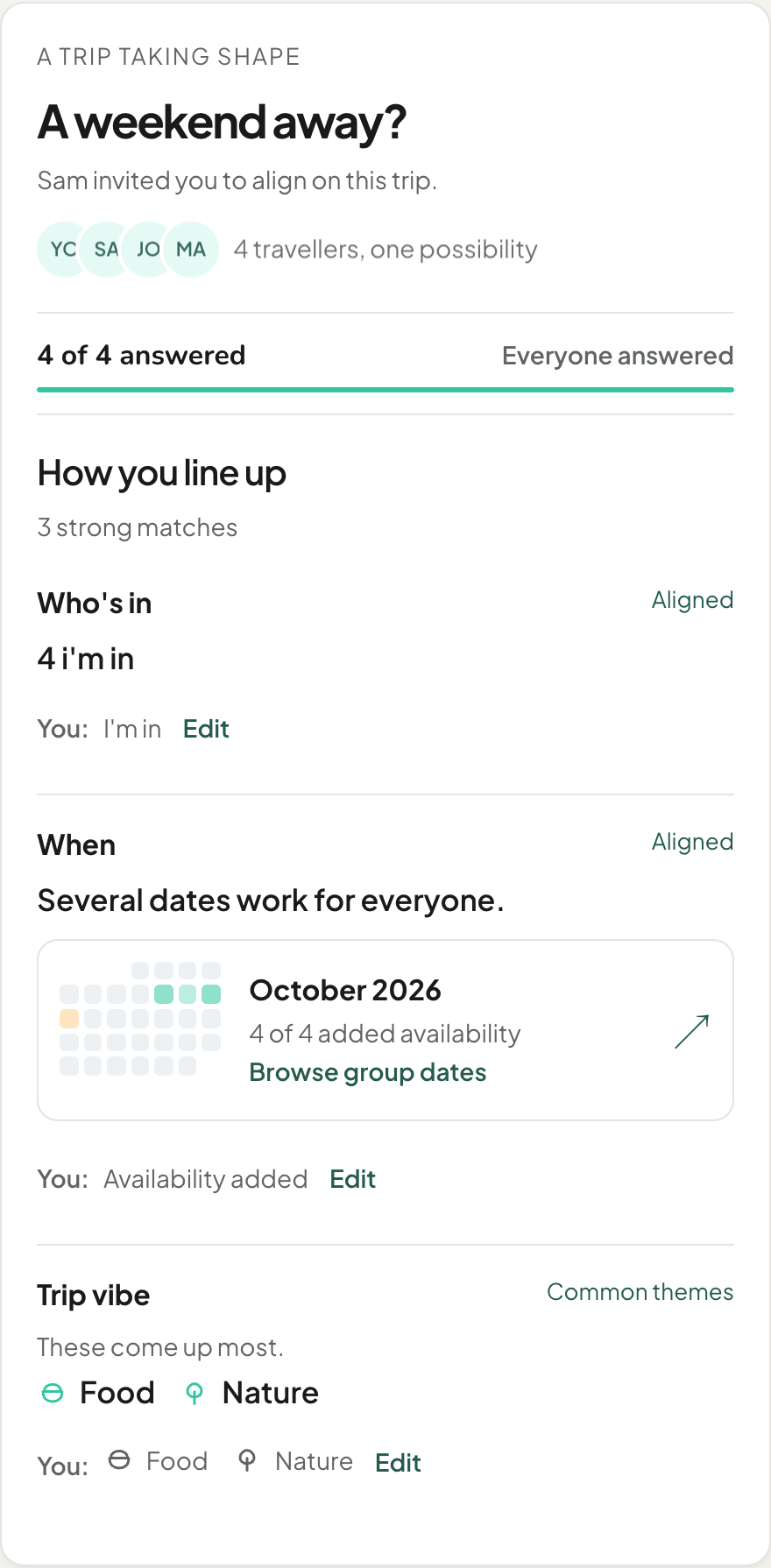
One weekend, four friends · Example
Let the group shape the trip.
Sam suggests a weekend away. The group can start responding while the destination and bookings are still open.
Give the idea a name.
Start with the trip idea template and share the invite link. Friends can open it on an iPhone, Android phone or laptop.
Let everyone answer.
Friends say whether they are in and choose their trip vibe. When a date request is open, they can mark their own availability in the browser.
Find the next decision.
After you answer the required questions, see how the group lines up. Food and nature are common themes in this example: a useful starting point for choosing where to go.
Four answers don’t make every date a yes.
All four friends have added availability. On October 10, three marked Works and one marked Maybe. The next step is to check that maybe, or choose a different window together.
Inspect each day of a possible stay, including travel days. Starting a new date request and finalizing dates happen in Awaii for iPhone.
Read the group date-planning guide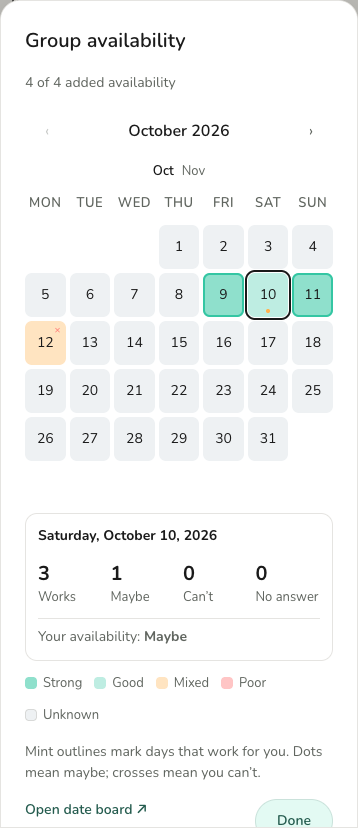
Start in a browser. Keep the whole trip together.
The web makes it easy to bring people in. Awaii for iPhone holds the full planning tools as the trip takes shape.
With a shared web link
- Start the group’s trip idea and invite friends.
- Answer questions without installing an app.
- Add availability while a date request is open.
- See group results after completing the required questions.
In Awaii for iPhone
- Save places, stays, links and detailed ideas.
- Manage date requests and finalize the trip dates.
- Edit the shared itinerary and keep bookings with the plan.
- Track expenses, prepare packing lists and open saved plans offline.
Started as a guest? Choose Keep access and connect an account to return to the same trip on another device. Access to other web views and editing depends on your trip role.
See the web and iPhone guideA little help before anyone books.
- Ask the useful questions
Twelve prompts about dates, costs and what matters to each person. Includes an Awaii PDF worksheet.
- Give the next task an owner
A printable checklist with room for an owner, due date and result.
- Planning for two?
See how shared planning fits a couple’s trip.
Before you start
Is Awaii a free group trip planner?
Awaii is currently free to use on the web and free to download for iPhone, with the planning experience included. You can start a trip idea and invite friends without creating an account.
Does everyone need an iPhone?
No. Friends can join through the link on Android, iPhone or a laptop to answer questions and add availability while a date request is open. The web app is in English. The full itinerary editor is in Awaii for iPhone.
Can we start before choosing a destination or dates?
Yes. A working trip name is enough to start the trip idea flow. Gather interest and preferences before booking. When a date request is open, friends can add availability in the browser; managing requests and finalizing dates happen on iPhone.
Can everyone edit the itinerary in their browser?
Full itinerary editing happens in the iPhone app. Web access follows the person’s trip role: identified members with edit access can add simple ideas, while guests have a smaller set of collaboration views.
How do I keep a trip I started as a guest?
Choose Keep access to connect an account to your existing guest trip. Use that account to return on another device and continue in Awaii for iPhone.
Can I use the plan offline?
In the iPhone app, your saved trip and plan remain available without a signal. Syncing, searching for places and loading new map data need internet. The web app needs an internet connection.
Got a trip in mind?
A working name is enough. Bring your people in and work out the rest together.
Start a tripCurrently free. No account needed to start on the web.