

Planning a trip together
Find dates for a trip with friends
Collect the days each person can travel, inspect the overlap and agree on a window. Here is how to read the group calendar without mistaking a maybe for a yes.
Collect availability in one place
Start with a rough month and trip length, such as two nights in October. Ask each person to mark the days that work, the days that might work and the days they cannot travel. Include the travel days as well as the days at your destination.
- Start a trip and share its link. Choose a starting point with a When question. Friends can join in a browser.
- Open When and check the request. When a date request is open, add your own availability, night preferences and weekend preference. Save your answers.
- Look at the group result. After you complete the required Align questions, the When preview opens a larger group calendar. Browse the months and select a day to inspect its counts.
If there is no open date request, the page shows the trip’s date state. Starting another request and finalizing dates are iPhone actions.
Read a real heatmap example
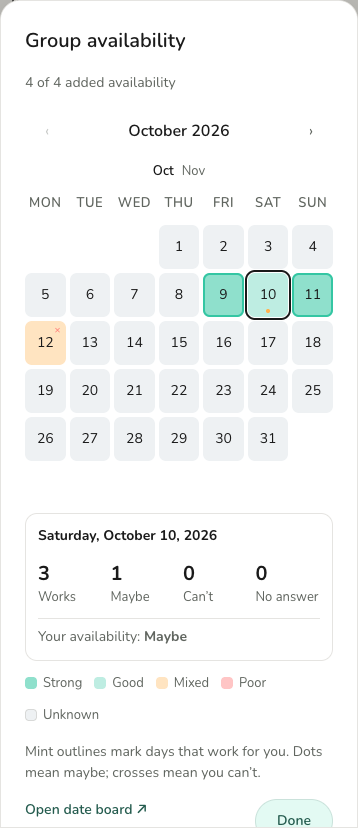
In this example, October 10 has three Works answers and one Maybe. All four people have added availability, but the group has not confirmed that this day works for everyone.
The selected outline tells you which day you are inspecting. The line “Your availability: Maybe” tells you about your own answer. Neither is a booking confirmation.
October 9 and 11 look promising. For a stay spanning October 10, the next useful action is to ask the person who marked Maybe whether that day can become Works.
A heatmap summarizes individual days. Check the whole proposed stay, everyone’s travel time and the requested number of nights before agreeing on dates.
Check all four counts before choosing
| Answer | How to use it |
|---|---|
| Works | The person marked this day as available. Check every day needed for the proposed trip. |
| Maybe | There is a condition to resolve. Ask what would make the day work. |
| Can’t | There is a known conflict. Find another window or discuss a different trip shape. |
| No answer | Availability is unknown for this day. A missing answer does not mean yes. |
“Four people answered” describes participation. “Four people can go on this day” describes availability. Use both before calling a window a match.
What if no dates work for everyone?
Change one constraint at a time so people know what they are responding to:
- Resolve the maybes. A person might be waiting for a work rota or leave approval. Agree when they can check.
- Try a shorter trip. Two nights may work even if a four-night stay does not.
- Look at another month. An organizer can manage a new date request in the iPhone app.
- Discuss partial attendance. If someone arrives later, confirm their travel dates and share of accommodation before booking.
If the trip needs every person present, keep looking. If the group is comfortable with a smaller trip, make that an explicit agreement. A popular date should not silently exclude someone.
Confirm the window, then make the plan
Write down the arrival date, departure date, number of nights, who has confirmed and who will book. Check travel and accommodation options for that exact window before paying.
Awaii’s web calendar helps people answer and inspect overlap. Finalizing the trip dates and editing the itinerary happen in Awaii for iPhone. If you started as a guest, use Keep access and connect an account to return to the same trip on another device.
For the wider decision process, read how to choose group trip dates.
Common questions
Can friends add availability without an iPhone?
Yes. They can join through the trip link and submit their own availability in a browser while the date request is open. The web app is in English.
Does the darkest date mean everyone can go?
Check the counts. A strong color alone is not enough: maybe answers, missing answers and the length of the proposed stay still matter.
Can I book or finalize dates from the heatmap?
The heatmap is for comparing availability. Finalizing trip dates happens in Awaii for iPhone; bookings are made with the travel provider.